
ARM

ARM is most known for their CPU architectures, but they also have a GPU architecture, MALI. Their devices support:

  • OpenCL
  • OpenGL
  • Vulkan
  • RenderScript

OpenCL

ARM takes OpenCL serious and has various developer boards and drivers for their MALI GPU. Most notable Samsung has their Exynos chips, but now also Rockchip brings high-end MALI GPUs.

Drivers and SDK

ARM MALI Linux SDKmali-product-feature-CLSDK-940x300_vX1

The SDK can be downloaded here. Developers manual is here. A 14-page FAQ with lots of answers on your questions is here.

For compilation on Ubuntu g++-arm-linux-gnueabi is needed. Also remove the “-none” in platform.mk. Then compilation will result in a libOpenCL.so.

mali-made

Drivers for Android

Software available for the Arndale can be found here – drivers (including graphics drivers with OpenCL-support) are here. The current state is that their OpenCL drivers are sometimes working, most times not – we are very sorry for that and try to find fixes.

We did not test the drivers with other devices than the Arndale with the same chipset (such as the new Chromebook and the Nexus 10).

Drivers for Linux

For the Samsung Chromebook drivers are available here. For Arndale these drivers should work too (not tested yet), if you use the kernel-drivers of the same version.

Firefly RK3288

Firefly-RK3288

The Firefly has:

RK3288 Cortex-A17 quad core@ 1.8GHz
Mali-T764 GPU with support for OpenGL ES 1.1/2.0 /3.0, OpenVG1.1, OpenCL, Directx11

Drivers have not yet been tested with this board yet! Cheap alternatives can be found here.

Exynos 5 Boards

The following boards are available:

  1. Arndale 5250-A
  2. YICsystem YSE5250
  3. YICsystem SMDKC520
  4. Nexus 10
  5. Samsung Chromebook

Scroll down for more info on these boards.

Board 1: Arndale 5250-A

The board is fully loaded and can be extended with touch-screen, SSD, Wifi+sound and camera. Below is an image with the soundboard and connectivity-board attached.

Working boards using OpenCL on display (click on image to see the Twitter-status):

Here are a few characteristics:

  • Cortex-A15 @ 1.7 GHz dual core
  • 128 bit SIMD NEON
  • 2GB 800MHz DDR3 (32 bit)

More information can be found on the wiki and forum.

Order information

For more information and to order, go to http://howchip.com/shop/item.php?it_id=AND5250A. For an overview of extensions, go to: http://howchip.com/shop/content.php?co_id=ArndaleBoard_en. The price is $250 for the board, $50 for shipping to Europe, and extension-boards start at $60. You need a VAT-number to get it through the customs, but you have to pay EU-VAT anyway.

Currently you need to order the LCD too, as the latest proprietary drivers (which includes OpenCL) does not work with HDMI. There are (vague) solutions, to be found on the forums.

Be sure you can buy a good 5V adapter (the + at the pin). A minimum of 3A is required for the board (TDP of the whole board is 11 to 12 Watt). Adapter costs around $25,- in the store, or you can buy them online for $7,50. You also need a serial cable – there are USB2COM-cables under €20,-. If you are in doubt, buy the $60,- package with cables (no COM2USB), adapter and microSD card.

Board 2: YICsystem YSE5250

This board has 2GB DDR3L(32bit 800MHz) and 8GB eMMC (onboard memory-card), USB 3.0 and LAN. Optional boards are for audio, WIFI, sensors (Gyroscope, Accelerometer, Magnetic, Light & Proximity), 5MB camera, LCD and GPS.

Currently it is unknown if OpenCL-drivers will be delivered, and there is no mention of it on their site.

SONY DSC

Below you’ll find the layout of the board.

yes5250_layout

Order information

You can order at http://www.yicsystem.com/products/low-cost-board/yse5250/. The complete board costs $245,-. Costs for shipping and import are unknown.

Board 3: YICsystem SMDKC520

The SMDKC520 board is the offical reference board of Samsung Exynos5250 System. Currently it is unknown if OpenCL-drivers will be delivered, but as chances are high I already put it here.

It is like the YSE5250, but it seems it includes WIFI, camera and LCD – though the webpage is very vague. Once I have more info on the YSE5250, I’ll continue on getting more infor on this board.

Price is unknown, but does not fall under “budget boards”.

smdkc520

Order information

You can send an enquiry at http://www.yicsystem.com/products/smdk-board/smdk-c520/. Remember that OpenCL-support is currently unknown!

Board 5: Google Nexus 10

OpenCL-drivers have been found pre-installed on this tablet, so with some tinkering you can run openCL rightaway.

It is a complete tablet, so no case-modding is needed. It has 2GB RAM, WIFI, 16 or 32GB eMMC, 5MP camera, 10″ WXGA LCD, all sensors, NFC, sound, etc. For all the specs, see this page.

n10-product-hero

Order information

You can order the Nexus 10 not in all countries, as google has restricted sales channels. See http://www.google.com/nexus/10/ for more info on ordering. With some creativity you can find ways to order this tablet into countries not selected by Google. Price is $400 or €400.

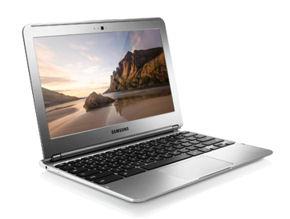
Board 6: Samsung Chromebook
chromebook

For €300 a complete laptop that runs Linux and has OpenGL ES and OpenCL 1.1 drivers? That makes it a great OpenCL “board”.

See ARM’s Chromebook dev-page for more information on how to get Linux running with OpenCL and OpenGL.

The drivers are brand new – when we’ve tested it, we’ll add more information on this page.

New grown-ups on the block

Members of the band There is one big reason StreamHPC chose for OpenCL and that is (future) hardware-support. I talked about NVIDIA versus AMD a lot, but knowing others would join soon. AMD is correct when they say the future is fusion: hybrid computing with a single chip holding both CPU- and GPU-cores, sharing the same memory and interconnected at high speed. Merging the technologies would also give possible much higher bandwidths to memory for the CPU. Let us see in short which products from experienced companies will appear on the OpenCL-stage.

Continue reading “New grown-ups on the block”

Social Media: Facebook, LinkedIn and Twitter

SC-Facebook

Facebook

We have presence on Facebook, via a company page: StreamHPC

Also check out Khronos’ OpenCL fanpage to hear more news on OpenCL.

LinkedIn

Via http://www.linkedin.com/company/StreamHPC you can hear more about company-specific news. It has the news comparable to the newsletter.

Twitter

You can also follow us on Twitter. We have several accounts:
[columns]
[one_half title=”General”]
 StreamHPC.
Our main account. Everything GPGPU, OpenCL and extreme software performance. .
OpenCL:Pro
with focus on jobs and internships. .
OpenCLHPC.
on OpenCL usage in HPC. .
WebCLNews
on the current state of WebCL. .
OpenCLGuru
to answer your questions on OpenCL – at your service. .
[/one_half]
[one_half title=”Hardware specific”]

OpenCLonAMD
on the current state of OpenCL on AMD-processors. .
 OpenCLonARM
on the current state of OpenCL on ARM-processors. .
 OpenCLonFPGAs
on the current state of OpenCL on FPGAs. .
 OpenCLonDSPs
on the current state of OpenCL on DSPs. .
OpenCLonRISC
on the current state of OpenCL on RISC. .
[/one_half]
[/columns]
We hope you enjoy our Twitter channels! If you have suggestions, just tweet us!

An example of real-world, end-user OpenCL usage

We ask all our customers if we could use their story on our webpage. For competition reasons, this is often not possible. The people of CEWE Stiftung & Co. KGaA were so kind to share his experience since he did a OpenCL training with us and we reviewed his code.

Enjoy his story on his experience from the training till now!

This year, the CEWE is planning to implement some program code of the CEWE Photoworld in OpenCL. This software is used for the creation and purchase of photo products such as the CEWE Photobook, CEWE Calendars, greeting cards and other products with an installation base of about 10 million throughout Europe. It is written in Qt and works on Windows, Mac and Linux.


In the next version, CEWE plans to improve the speed of image effects such as the oil painting filter, to become more useful in the world of photo manipulation. Customers like to some imaging effects to improve photo products, to get even more individual results, fix accidentally badly focused photos and so on.

Continue reading “An example of real-world, end-user OpenCL usage”

Lectures at Universities

Does your school or university have interest in hearing all around the complete new generation of processors? New generation? Yes, the processor-architecture has had post-development on it base design (most notable dual-core and SSE), but it will be radically changed and with that also its programming methods.

StreamHPC can visit your institute to give lectures of one or two hours to your students about how processors of the near future will look like and work. From GPUs to new CPU-extensions, and from Hybrid CPU-GPUs to mobile processors. This all for the price of travelling and staying-expenses.

Practicals, series of colleges and such are also possible. Please contact Vincent Hindriksen for more information and reservations.

StreamHPC is an independent trainer in how to program these modern parallel processors.

9 questions on OpenCL’s future answered at IWOCL

IWOCL-logoDuring the panel discussion some very interesting questions were asked, I’d like to share with you.

Should the Khronos group poll the community more often about the future of OpenCL?

I asked it on twitter, and this is the current result:khronos-community-feedback

Khronos needs more feedback from OpenCL developers, to better serve the user base. Tell the OpenCL working group what holds you back in solving your specific problems here. Want more influence? You can also join the OpenCL advisory board, or join Khronos with your company. Get in contact with Neil Trevett for more information.

How to (further) popularise OpenCL?

While the open standard is popular at IWOCL, it is not popular enough at universities. NVidia puts a lot of effort in convincing academics that OpenCL is not as good as CUDA and to keep CUDA as the only GPGPU API in the curriculum.

Altera: “OpenCL is important to be thought at universities, because of the low-level parts, it creates better programmers”. And I agree, too many freshly graduated CS students don’t understand malloc() and say “The compiler should solve this for me”.

The short answer is: more marketing.

At StreamHPC we have been supporting OpenCL with marketing (via this blog) since 2010. 6 years already. We are now developing the website opencl.org to continue the effort, while we have diversified at the company.

How to get all vendors to OpenCL 2.0?

Ofcourse this was a question targeted at NVidia, and thus Neil Trevett answered this one. Use a carrot and not a stick, as it is business in the end.

Think more marketing and more apps. We already have a big list:opencl-library-ecosphere

Know more active(!) projects? Share!

Can we break the backwards compatibility to advance faster?

This was a question from the panel to the audience. From what I sensed, the audience and panel are quite open to this. This would mean that OpenCL could make a big step forward, fixing the initial problems. Deprecation would be the way to go the panel said. (OpenCL 2.3 deprecates all nuisances and OpenCL 3.0 is a redesign? Or will it take longer?)

See also the question below on better serving FPGAs and DSPs.

Should we do a specs freeze and harden the implementations?

Michael Wong (OpenMP) was clear on this. Learn from C++98. Two years were focused on hardening the implementations. After that it took 11 years to restart the innovation process and get to C++11! So don’t do a specs freeze.

How to evolve OpenCL faster?

Vendor extensions are the only option.

At StreamHPC we have discussed a lot about it, especially fall-backs. In most cases it is very doable to create slower fall-backs, and in other cases (like with special features on i.e. FPGAs) it can be the only option to make it work.

How to get more robust OpenCL implementations?

Open sourcing the Vulkan conformance tests was a very good decision to make Vulkan more robust. Khronos gets a lot of feedback on the test cases. It will be discussed soon to what extend this also can be done for OpenCL.

Test-cases from open source libraries are often used to create more test cases.

How to better support FPGAs and DSPs?

Now GPUs are the majority and democracy doesn’t work for the minorities.

An option to better support FPGAs and DSPs in OpenCL is to introduce feature sets. A lesson learnt from Vulkan. This way GPU vendors don’t need to spend time implementing features that they don’t find interesting.

Do we see you at IWOCL 2017?

Location will be announced later. Boston and Toronto are mentioned.

How expensive is an operation on a CPU?

Programmers know the value of everything and the costs of nothing. I saw this quote a while back and loved it immediately. The quote by Alan Perlis is originally about Perl LISP-programmers, but only highly trained HPC-programmers seem to have obtained this basic knowledge well. In an interview with Andrew Richards of Codeplay I heard it from another perspective: software languages were not developed in a time that cache was 100 times faster than memory. He claimed that it should be exposed to the programmer what is expensive and what isn’t. I agreed again and hence this post.

I think it is very clear that programming languages (and/or IDEs) need to be redesigned to overcome the hardware-changes of the past 5 years. I talked about that in the article “Separation of compute, control and transfer” and “Lots of loops“. But it does not seem to be enough.

So what are the costs of each operation (on CPUs)?

This article is just to help you on your way, and most of all: to make you aware. Note it is incomplete and probably not valid for all kinds of CPUs.

Continue reading “How expensive is an operation on a CPU?”

Selecting Applications Suitable for Porting to the GPU

Assessing software is never comparing apples to apples

The goal of this writing is to explain which applications are suitable to be ported to OpenCL and run on GPU (or multiple GPUs). It is done by showing the main differences between GPU and CPU, and by listing features and characteristics of problems and algorithms, which can make use of highly parallel architecture of GPU and simply run faster on graphic cards. Additionally, there is a list of issues that can decrease potential speed-up.

It does not try to be complete, but tries to focus on the most essential parts of assessing if code is a good candidate for porting to the GPU.

GPU vs CPU

The biggest difference between a GPU and a CPU is how they process tasks, due to different purposes. A CPU has a few (usually 4 or 8, but up to 32) ”fat” cores optimized for sequential serial processing like running an operating system, Microsoft Word, a web browser etc, while a GPU has a thousands of ”thin” cores designed to be very efficient when running hundreds of thousands of alike tasks simultaneously.

A CPU is very good at multi-tasking, whereas a GPU is very good at repetitive tasks. GPUs offer much more raw computational power compared to CPUs, but they would completely fail to run an operating system. Compare this to 4 motor cycles (CPU) of 1 truck (GPU) delivering goods – when the goods have to be delivered to customers throughout the city the motor cycles win, when all goods have to be delivered to a few supermarkets the truck wins.

Most problems need both processors to deliver the best value of system performance, price, and power. The GPU does the heavy lifting (truck brings goods to distribution centers) and the CPU does the flexible part of the job (motor cycles distributing doing deliveries).

Assessing software for GPU-porting fitness

Software that does not meet the performance requirement (time taken / time available), is always a potential candidate for being ported to a GPU. Continue reading “Selecting Applications Suitable for Porting to the GPU”

AccelerEyes ArrayFire

There is a lot going on at the path to GPGPU 2.0 – the libraries on top of OpenCL and/or CUDA. Among many solutions we see for example Microsoft with C++ AMP on top of DirectCompute, NVidia (and more) with OpenACC, and now AccelerEyes (most known for their Matlab-extension Jacket and libJacket) with ArrayFire.

I want you to show how easy programming GPUs can be when using such libraries – know that for using all features such as complex numbers, multi-GPU and linear algebra functions, you need to buy the full version. Prices start at $2500,- for a workstation/server with 2 GPUs.

It comes in two flavours: for OpenCL (C++) and for CUDA (C, C++, Fortran). The code for both is the same, so you can easily switch – though you still see references to cuda.h you can compile most examples from the CUDA-version using the OpenCL-version with little editing. Let’s look a little into what it can do.

Continue reading “AccelerEyes ArrayFire”

Birthday present! Free 1-day Online GPGPU crash course: CUDA / HIP / OpenCL

Stream HPC is 10 years old on 1 April 2020. Therefore we offer our one day GPGPU crash course for free that whole month.

Now Corona (and fear for it) spreads, we had to rethink how to celebrate 10 years. So while there were different plans, we simply had to adapt to the market and world dynamics.

5 years ago…
Continue reading “Birthday present! Free 1-day Online GPGPU crash course: CUDA / HIP / OpenCL”

Self-Assessment GPGPU-role

As we’re not a university but a company, there needs to be a balance between things you can offer and the things we offer. Like in every job description, there is a list of bullet points to explain what we seek. To make it possible to self-asses your fitness for the job, we’ve put the number of points (✪) for each bullet point.

INSTRUCTIONS. For each section, assess yourself as being a:

  1. beginner: have been in contact with it briefly
  2. junior: had some experience, but not difficult problems
  3. medior: had more experience, but cannot coach others yet
  4. senior: experienced enough to coach others to really advance on this subject
  5. lead: can teach new things to a senior
  6. principal/master/guru: one of the world’s best

You need to look for the level where you get the most points. For example, if you are a master in C++ but are a medior in C and math, it might actually be best to assess as a medior and mention your C++ knowledge specifically. Or for example, if you are sure you can successfully finish a tutorial on GPGPU, you’re a beginner.

Real question to answer before applying: do you want to become a senior in GPGPU?

If you have the imposter syndrome, don’t be too harsh on yourself. If you’re overconfident, be realistic. If you worry you’re both, pick imposter syndrome only.

Heads up. During the interviews, we ask questions for the above self-assessment. If you assess yourself as a senior for GPU-coding because you were the best-of-class, you’ll get questions. And there is no person who can be defined by lists, so do mention where you stand out.

You, as a CPU Developer (9 items, 18 weights)

We seek people with experience. This can be open source projects for first jobseekers, or past jobs for those with job experience.

  1. You are capable of designing mathematical algorithms, both serial and parallel. ✪
  2. You are strong in math and hard sciences. ✪✪
  3. You know how compilers work, and you are unfortunate enough to know when they don’t. ✪✪
  4. You are experienced in C. ✪✪
  5. You are experienced in C++. ✪✪
  6. You have experience designing performance-driven architectures. ✪✪
  7. You know how to write tests. ✪✪✪
  8. You are experienced with continuous development. ✪✪
  9. You have experience with low-level optimizations. ✪✪

You, as a GPU Developer (6 items, 15 weights)

We seek people with experience. This can be open source projects for first jobseekers, or past jobs for those with job experience.

  1. You have read “hardware architecture specification documents” or ISA-docs. ✪
  2. You know how GPU-compilers work, and you are unfortunate enough to know when they don’t. ✪✪
  3. You are experienced in CUDA and/or HIP. ✪✪✪✪
  4. You are experienced in OpenCL and/or SYCL. ✪✪✪✪
  5. You know your way around with GPU-libraries. ✪
  6. You are experienced in porting algorithms to the GPUs, without the use of any library. ✪✪✪

As the four stars indicate, we do need minimal GPGPU-experience, as you won’t learn it here.

You, as a Problem Solver (8 items, 21 weights)

Coding is only one part of the solution. Most of the time we’re solving problems, where coding is just the means.

  1. You like the ideas and theories around the “learning mindset”. ✪✪✪
  2. You have a structured problem-solving approach that you could explain. ✪✪✪
  3. You have high self-awareness and can self-observe. ✪✪✪✪
  4. You have high standards for yourself. ✪✪
  5. You test out approaches by making quick experiments. ✪✪
  6. You test out possible solutions by mentally putting them in different scenarios. ✪
  7. You regularly take time to zoom out to get an overview on the problem, to be able to balance the inputs for the solution. ✪✪✪✪
  8. You always follow through. ✪✪

If you score high here, this will compensate for any lack of technical experience. Also for continuous growth, you’ll need to score high here.

You, as a Project Team Member (10 items, 20 weights)

Our company’s strength is that we work in teams. We don’t know everything as individuals, but as a team we can solve almost any problem around HPC and GPUs. This means we highly value collaboration and thus must be efficient in project handling.

  1. You have a proven track record of being focused on results. ✪
  2. You have a talent for turning vague problems into the right actions, and you want to build on it. ✪
  3. You normally write down tasks, and then prioritize & ESTIMATE them. ✪✪✪
  4. You understand that well-defined, well-communicated delivery criteria are the responsibility of every team member. ✪✪✪
  5. You can identify something’s missing to move a project forward smoothly. ✪✪✪
  6. You speak up when the project diverges from the trajectory. ✪✪
  7. You are used to administrating your time spent on an issue. ✪
  8. You can delegate work. ✪✪
  9. You can get work delegated. ✪✪
  10. You can explain, with examples, why the above are important. ✪✪

We explicitly did not state “project management”. It is about playing your part of making an efficient team.

What’s next?

If you got at least junior on CPU, Team, and problem-solving, beginner on GPU, and at least one of the 4 on medior? Then you should apply. Go to https://streamhpc.com/jobs/ for the instructions and links to other articles that should help you with understanding if this is a job for you.

Understand that if you are a true beginner in GPGPU, it’s best to follow the tips&tricks explained here.

OpenCL in the Clouds

Buzz-words are cool; they are loosely defined and are actually formed by the many implementation that use the label. Like Web 2.0 which is cool javascript for the one and interaction for the other. Now we have cloud-computing, which is cluster-computing with “something extra”. More than a year ago clouds were in the data-centre, but now we even have “private clouds”. So how to incorporate GPGPU? A cluster with native nodes to run our OpenCL-code with pre-distributed data is pretty hard to maintain, so what are the other solutions?

Distributed computing

Folding@home now has support for OpenCL to add the power of non-NVIDIA GPUs. While in clusters the server commands the clients what they have to do, here the clients ask the server for jobs. Disadvantage is that the clients are written for a specific job and are not really flexible to take different kind of jobs. There are several solutions for this code-distribution-problem, but still the solution is not suitable for smaller problems and small clusters.

Clusters: MPI

The project SHOC (Scalable HeterOgeneous Computing) is a collection of benchmark programs testing the performance and stability of systems using computing devices with non-traditional architectures for general purpose computing, and the software used to program them. While it is only a benchmark, it can be of great use when designing a cluster. For the rest I only  found CUDA MPI-solutions, which are not ported to OpenCL yet.

Also check out Hoopoe, which is a cloud-computing service to run your OpenCL-kernels in their cloud. It seems to be more limited to .NET and have better support for CUDA, but it is a start. In Europe there is a start-up offering a rent-model for OpenCL-computation-time; please contact us if you want to get in contact with them.

Clusters: OpenMP

MOSIX has added a “Many GPU Package” to their cluster management system, so it now allows applications to transparently use cluster-wide OpenCL devices. When “choosing devices” not only the local GPU pops up, but also all GPUs in the cluster.
It works disk-less, in the way no files are copied to the computation-clients and all stays in-memory. Disk-less computations have an advantage when cloud-computer are not fully trusted. Take note that on most cloud-computers the devices need to be virtualised (see next part).

Below is its layered model, VCL being the “Virtual OpenCL Layer”.

They have chosen to base it on OpenMP; while the kernels don’t need to be altered, some OpenMP-code needs to be added. They are very happy to tell it takes much less code to use openMP instead of MPI.

You see a speed-up between 2.19 and 3.29 on 4 nodes is possible. We see comparable cluster-speed-ups in an old cluster-study. The actual speed-up on clusters depends mostly on the amount of data that needs to be transferred.

The project references to a project called remote CUDA, which only works with NVIDIA-GPUs.

Device Virtualisation

Currently there is no good device virtualisation for OpenCL. The gVirtuS-project currently only supports CUDA, but they claim it is easily rewritten to OpenCL. Code needs to be downloaded with a Mercurius-client (comparable to GIT and in repositories of most Linux-distributions):
> hg clone http://osl.uniparthenope.it/hg/projects/gvirtus/gvirtus gvirtus
Or download it here (dated 7-Oct-2010).

Let me know when you ported it to OpenCL! Actually gVirtuS does not do the whole trick since you need to divide the host-devices between the different guest-OSes, but luckily there is an extension which provides sharing of devices, called fission. More about this later.

We can all agree there still needs to be done a lot in this area of virtualised devices to get OpenCL in the cloud. If you can’t wait, you can theoretically use MOSIX locally.

Afterword

A cloud is the best buzz-word to market a scalable solution to overcome limitations of internet connected personal devices. I personally think the biggest growth will be in personal clouds, so companies will have their own in-house cloud-server (read: clusters); people just want to have a feeling of control, comparable with preference of a daily traffic jam above public transport. But nevertheless shared clouds have potential if it comes to computation-intensive jobs which do not need to be done all year round.

The projects presented here are a start to have OpenCL-power at a larger scale for more demanding cases. Since we can have more power at our fingertips with one desktop-pc stuffed with high-end video-cards than a 4-year-old supercomputer-cluster, there is still time

Please send your comment if I missed a project or method.

Freescale / Vivante

Vivante got into the news with OpenCL, when winning in the automotive-industry from NVIDIA. Reason: the car-industry wanted an open standard. They have support for:

  • OpenCL
  • OpenGL
  • Google RenderScript

OpenCL

See Vivante’s GPGPU-page for more info, where below table is taken from.

GC800 Series GC1000 Series GC2000 Series GC4000 Series GC5000 Series GC6000 Series
Clock Speed MHz 600 – 800 600 – 800 600 – 800 600 – 800 600 – 800 600 – 800
Compute Cores 1 1 1 2 4 Up to 8
Shader Cores 1 (Vec-4)
4 (Vec-1)
2 / 4 (Vec-4)
8 / 16 (Vec-1)
4 (Vec-4)
16 (Vec-1)
8 (Vec-4)
32 (Vec-1)
8 (Vec-4)
32 (Vec-1)
16 (Vec-4)
64 (Vec-1)
Shader GFLOPS 6–8 (High)
12–16 (Medium)
11–30 (High)
22–60 (Medium)
22–30 (High)
44–60 (Medium)
44–60 (High)
88–120 (Medium)
44–60 (High)
88–120 (Medium)
88–118 (High)
176–236 (Medium)
GPGPU Options Embedded Profile Embedded Profile Embedded / Full Profile Embedded / Full Profile Embedded / Full Profile Embedded / Full Profile
Cache Coherent Yes Yes Yes Yes Yes Yes

One big advantage Vivante claims to have over the competition, is the GFLOPS/mm2. This could be of advantage to win the 1TFLOPS-war over their competition (which they’ve entered). The upcoming GC4000 series can push around 48GFLOPS, leaving the 1TFLOPS to the GC6000 series.

Their GPUs are sold as IP to CPU-makers, so they don’t sell their own chips. Vivante has created the GPU-drivers, but you have to contact the chip-maker to obtain them.

Freescale i.MX6

Freescale-COLOR_LOGO_JPG3The i.MX6 Quad (4 ARM Cortex-A9 cores) and i.MX6 Dual (2 ARM Cortex-A9 cores) have support for OpenCL 1.1 EP (Embedded Profile). (source)

Both have a Vivante GC2000 GPU, which has 16 GFLOPS to 24 GFLOPS depending on the source. The GPU cores can be used to run OpenGL 2.0 ES shaders and OpenCL EP kernels.

Board: SABRE

SAMSUNGThere are several boards available. Freescale suggests to use the SABRE Board for Smart Devices ($399).

This Linux board support package including OpenCL drivers and general BSP documentation is available for free download on the product page under Software & Tools tab.


Other Boards

Alternative evaluation boards from 3rd parties can be found by searching on internet for “i.MX6Q board” as there are many! For instance the Wandboard (i.MX6Q, $139, shown at the left – was tipped that the Dual is actually a Duallite and thus not have support!!).

OpenCL-driver found on the Wandboard Ubuntu-image – download clinfo-output here (gcc clinfo.c -lOpenCL -lGAL).

Drivers & SDK

Under the Software & Tools tab of the SABRE-board there are drivers – they have not been tested with other boards, so no guarantees are given.

Most information is given in Get started with OpenCL on Qualcomm i.MX6.

  • IMX6_GPU_SDK: a collection of GPU code samples, for OpenCL the work is still in progress. You can find it under “Software Development Tools” -> “Snippets, Boot Code, Headers, Monitors, etc.”
  • IMX_6D_Q_VIVANTE_VDK_<version>_TOOLS: GPU profiling tools, offline compiler and an emulator with CL support which runs on Windows platforms. Be sure you pick the latest version! You can find it under “Software Development Tools” -> “IDE – Debug, Compile and Build Tools“.


More infoaea40d73gd9233c367a17&690

Check out the i.MX-community. You can also contact us for more info.

To see a great application with 4 i.MX6 Quad boards using OpenCL, see this “Using i.MX6Q to Build a Palm-Sized Heterogeneous Mini-HPC” project.

Event: Embedded boards comparison

A 2012 board
One of the first OpenCL enabled boards from 2012.

Date: 17 September 2015, 17:00
Location: Naritaweg 12B, Amsterdam
Costs: free

Selecting the right hardware for your OpenCL-powerd product is very important. We therefore organise a three hour open house where we you can test, benchmark and discuss many available chipsets that support OpenCL. For each showcased board you can read and hear about the advantages, disadvantages and preferred types of algorithms.

Board with the following chipsets will be showcased:

  • ARM Mali
  • Imagination PowerVR
  • Qualcomm Snapdragon
  • NVidia Tegra
  • Freescale i.MX6 / Vivante
  • Adapteva

Several demo’s and benchmarks are prepared that will continuously run on each board. We will walk around to answer your questions.

During the evening drinks and snacks are available.

Test your own code

There is time to test OpenCL code for free in our labs. Please get in contact, as time that evening is limited.

Registration

Register by filling in the below form. Mention with how many people you will come, if you come by car and if you want to run your own code.

[contact_form]

MediaTek’s partners deliver OpenCL on their phones

MediatekSeveral Chinese phones bring OpenCL to millions of users, as MediaTek offers their drivers to all phone vendors who use their (recent) chipsets.

Mediatek said that you just need a phone with one of the below chipsets and you can run your OpenCL-app, as they provide the driver-stack with the hardware to their customers. I’ve added a few phone names, but there is no guarantee OpenCL drivers are actually there. So be on the safe side and don’t buy the cheapest phone, but a more respected China-brand. Contact us if  you got a phone with the chipset that doesn’t work – then I’ll contact Mediatek. Share you experience with the chipset in the comments.

In case you want to use the phone for actual use, be sure it supports your 4G frequencies. Also check this Gizchina article on the below chipsets. There are more MediaTek-chipsets that support OpenCL, but not openly – they prefer to focus on their latest 64-bit series.

Important note on conformance: Mediatek is an adopter and does conform for a few processors. Of the ones listed below, only MT6795 is certain to have official support. Continue reading “MediaTek’s partners deliver OpenCL on their phones”

PHD position at university of Newcastle

emcAt the university of Newcastle they use OpenCL for researching the performance balance between software and hardware. This resource management isn’t limited to shared memory systems, but extends to mixed architectures where batches of co-processors and other resources make it much more complex problem to solve. They chose OpenCL as it gives both inter-node and intra-node resource-management.

Currently they offer a PhD position and seek the brilliant mind that can solve the heterogeneous puzzle like a chess player. It is a continuation of years of research and the full description is in the PDF below.

Continue reading “PHD position at university of Newcastle”

New: OpenCL Crash Courses

opencl-logoTo see if OpenCL is the right choice for your project, we now only ask one day of your time. This enables you to quickly assess the technology without a big investment.

Throughout Europe we give crash courses in OpenCL. After just one day you will know:

  • The models used to define OpenCL.
  • If OpenCL is an option for your project.
  • How to read and understand OpenCL code.
  • Code simple OpenCL programs.
  • Differences between CPUs, GPUs and FPGAs.

There are two types: GPU-oriented and FPGA-oriented. We’ve selected Altera FPGAs and AMD FirePro GPUs to do the standard trainings.

[eme_events category=4]

If you are interested to get a certain crash course in another city than currently scheduled, fill in the below form to get notified when the crash course of your city of choice.

We will add more dates and places continuously. If you want to host an OpenCL crash course event, get in contact.

Note: crash courses are intended to get you in contact with software accelerators, so it doesn’t replace a full training.

An introduction to Grid-processors: Parallella, Kalray and KnuPath

gridWe have been talking about GPUs, FPGAs and CPUs a lot, but there are more processors that can solve specific problems. This time I’d like you to give a quick introduction to grid-processors.

Grid-processors are different from GPUs. Where a multi-core GPU gets its strength from being able to compute lots of data in parallel (SIMD data-parallellism), a grid-processors is able to have each core do something differently (MIMD, task-based parallelism). You could say that a grid-processor is a multi-core CPU, where the number of cores is at least 16, and the cores are only connected to their neighbours. The difference with full-blown CPUs is that the cores are smaller (like the GPU) and thus use less power. The companies themselves categorise their processors as DSPs or Digital Signal Processors, but most popular DSPs only have 1 to 8 cores.

For the context, there are several types of bus-configurations:

  • single bus: like the PCIe-bus in a PC or the iMX6.
  • ring bus: like the XeonPhi till Knights Corner, and the Cell processor.
  • star bus: a central communication core with the compute-cores around.
  • full mesh bus: each core is connected to each core.
  • grid bus: all cores are connected to their direct neighbours. Messages hop from core to core.

Each of them have their advantages and disadvantages. Grid-processors get great performance (per Watt) with:

  • video encoding
  • signal processing
  • cryptography
  • neural networks

Continue reading “An introduction to Grid-processors: Parallella, Kalray and KnuPath”

Looking for the company’s GPU-pioneers

Getting from the technical advantages to the business advantages we have extensive experience.

Several projects were introduced to us via the company’s GPU-pioneer. These collaborations were very successful and pleasant to do, due to the internal support within the company. This is a reason we would like to do more of these – this text is dedicated to the GPU-pioneers out there.

Seeing the potential of GPUs is not easy, even when you’ve carefully read the 13 types of algorithms that OpenCL can speed up. So it’s even harder to convince your boss that GPUs are the way to go.

Here is where we come in. This is what you need to do. Continue reading “Looking for the company’s GPU-pioneers”

GPU and FPGA challenge for MSc and PhD students

While going through my email, I found out about the third “HiPEAC Student Heterogeneous Programming Challenge”. Unfortunately the deadline was last week, but just got an email: if you register by this weekend (17 September), you can still join.

EDIT: if you joined, be sure to comment in early November how it was. This would hopefully motivate others to join in next year. Continue reading “GPU and FPGA challenge for MSc and PhD students”