
When AMD came out with CPU-support I was the last one who was enthusiastic about it, comparing it as feeding chicken-food to oxen. Now CUDA has CPU-support too, so what was I missing? This article is a quick overview on OpenCL on CPU-extensions, but expect more to come when the Hybrid X86-Processors actually hit the market. Besides ARM, IBM also already has them. I will also write more about their POWER-architecture in an upcoming article to give them the attention they deserve.
CPU extensions
Before we can talk about OpenCL on the CPU, we need to talk about the extensions themselves. SSE/MMX started in the 90’s extending the IBM-compatible X86-instruction, being able to do an add and a multiplication in one clock-cycle. I still remember the discussion in my student-flat. There was no way the MP3s my 166MHz PC could produce in 4 minutes were of better quality than those that took 15 minutes. But they were. This is because the encoder I “found” on the internet made use of SSE-capabilities. Currently we have reached SSE5 by AMD, and Intel introduced a new extension called AVX. That’s a lot of abbreviations! MMX stands for “MultiMedia Extension”, SSE for “Streaming SIMD Extensions” with SIMD being “Single Instruction Multiple Data” and AVX for “Advanced Vector Extension”. This sounds actually very interesting, since we saw SIMD and Vectors op the GPU too. Let’s go into SSE (1 to 4) and AVX – both fully supported on the new CPUs by AMD and Intel.
SSE – a quick(!) overview
If you look through the history of version 1 to 5, you see different names and different subsequent extensions, like “SSE 4.2a”. What’s more interesting for us is where to find the “packed” instructions. Packed stands for a bundle of data, so actual parallel instructions; but not massively parallel. The last two letters of the instruction are important for us: Packed or Single, and Precision. Precision can be Single, Double, Word, Quadword or Binary. Later (in SSSE3) packed-instructions start with a P, and SSE4 mixes both naming-conventions. So all xxxPx and many Pxxx instructions are of of interest. If you check the details of those packed instruction, you see that the single-precision have twice a much input as the double. And that’s why it’s called “packed” and is directly the limit of SSE.
SSE has the most important instructions introduced, and tomesani.com explains these well. SSE2 completed SSE1 for all types. SSE3 (Pentium 4 / Athlon 64) adds instructions to add and subtract the multiple values stored within a single register. SSSE3 introduces only packed instructions. These include permuting the bytes in a word, multiplying 16-bit fixed-point numbers with correct rounding, and within-word accumulate instructions. SSE4 (Core2 duo) had a two very interesting additions: “Compute eight offset sums of absolute difference” and the dot-product.
There is a lot more to read on the instruction-sets, but I leave it by this, since I’m not an expert on this. If you know a good article, just put it in the the comments.
AVX – another quick overview
AMD’s SSE5 exists out of XOP, CVT16 (together AVX-like) and FMA (fused multiply-add, to be implemented by Intel later). Since AMD has said they will implement AVX too, I focus on AVX only for now. For a complete overview, see AVX on Wikipedia and Intel’s AVX-page.
The instructions start with a “V” for Vector now. But how to get vectors in, when the SSE-instructions are restricted by the maximum pack-size? The answer lies in a VEX-prefix; according to Wikipedia this allows instruction codes to have up to five operands, where the original scheme allows only two operands (in rare cases three operands). It also allows the size of SIMD vector registers to be extended from the 128-bits XMM registers to 256-bits registers named YMM. There is room for further extensions of the register size in the future.
So in short, they have doubled the register-size. If we look at single precision (32 bit) and 1 core only for now, that brings us to:
- X86-instructions: 2 operands
- SSEx: 4 operands
- AVX: 8 operands
A CPU’s clock-speed is roughly 4 times higher than a GPU’s. So, a quad-core using AVX would give 8 x 4 x 4 = 128 GPU-cores-equivalents. That’s bull would most say; I agree, but it does give an idea of its parallel potential.
Transfer times
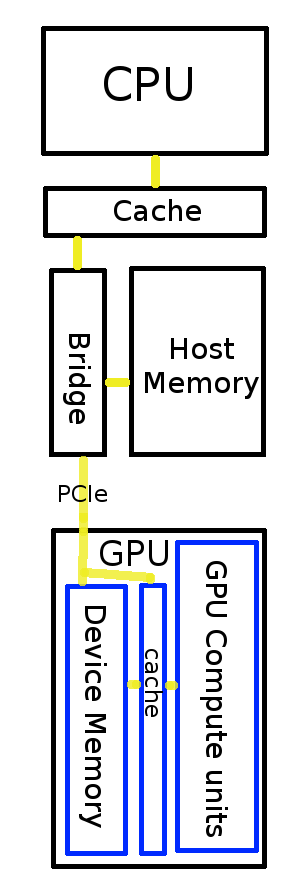
Copying a block of memory to the GPU takes a lot of time, since the PCIe’ bus-speed is limited to 8 GB/s (64 Gb/s). Now, you may say that DDR3 is more than twice as fast as that, but you have to know that all the data has to go via the CPU and thus the actual speed is of the PCIe is 4GB/s. Also, there is no possibility for CPU-extras such as caching. Although I haven’t found clues that support the idea that OpenCL for Intel uses CPU-caching directly. You also see a lot of benchmarks of OpenCL both with and without transfer-times, like this one on Bealto where around one eighth part is spent transferring data.
(The following is added on 10-DEC-2010)
Maximum memory-bandwidths gives an idea of bottles&necks:
- Sandy Bridge: 25.6 GByte/s (and even faster cache)
- NVIDIA M2070: 150.0 GB/s
- AMD HD6870: 134.4 GB/s
- PCIe 2.x: 4GB/s.
Here is where architecture-optimising will make a big difference. Because of the transfer to the GPU and the setup of the programming (i.e. need for batch-loading and more memory-bandwith available), the software will be totally different than one written for a CPU.
This is actually a subject on its own, so later more on transfer-times and latency. I wanted to make a point that it takes clock-cycles to get the data to and from the GPU.
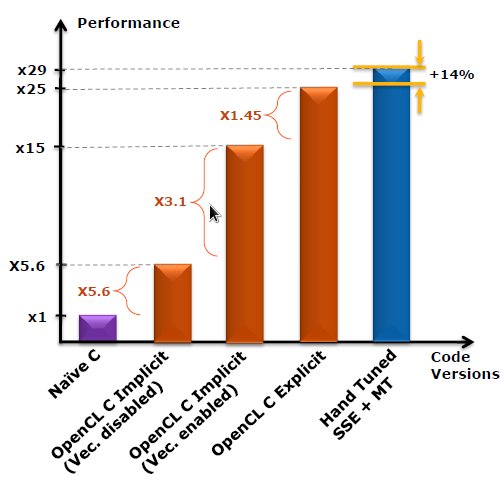
The image shows how Intel sped up an N-body simulation on their CPU by 25x, but they’ll probably release better benchmarks Q1 2011. Read their full presentation here.
Conclusion
I was missing the extensions for sure: they are not as parallel as GPUs, but there is clearly more parallel going on in a CPU than parallel memory-buses and multiple cores. So what are the big advantage for using OpenCL on a CPU?
- The results are on the CPU for further processing
- CPU-code can be mixed with OpenCL – this means extra optimisation-potential when OpenCL-code is compiled
- Specific algorithms can be processed faster because there is no PCIe-overhead
- We still have the GPU
We saw the first two items of the list on the discussion-boards when mixing OpenCL with OpenGL was discussed. When interoperability with OpenGL-code is important, then OpenCL-on-the-CPU might not be the best strategy – as mixing with CPU-code processing on the GPU might not be the best strategy.
The performance of an embedded OpenCL-capable GPU on a CPU might be placed between AVX and a separate high-end GPU, but overlaps mostly with AVX and therefore the current focus on AVX is a logical decision. The first benchmarks of OpenCL-on-SSEx now come in, but for interesting results we have to wait until the launch of Intel Sandy Bridge in a few weeks.
For sure we can open up all thrown away projects where the PCIe-overhead was an issue.
Pingback: A Closer Look at OpenCL on the CPU: AVX and SSE | insideHPC.com
Pingback: OpenCL on the CPU: AVX and SSE